A practical guide based on building a production long-press context menu

Long press → backdrop fades → bubble lifts → reactions stagger → menu slides. Tap backdrop to smoothly reverse.
The Quick Answer
| Use Case | Winner |
|---|---|
| Simple enter/leave | Angular @angular/animations |
| State transitions (open/closed) | Angular @angular/animations |
| Multi-element choreography | Ionic AnimationController |
| Interruptible animations | Ionic AnimationController |
| Staggered sequences | Ionic AnimationController |
| Gesture-driven animations | Ionic AnimationController |
If you’re building something like a modal or toast, Angular animations are fine. If you’re building something like a long-press context menu with coordinated elements that users can interrupt, use Ionic’s AnimationController.
The Setup: What We’re Building
A WhatsApp/iMessage-style long-press context menu:
- Backdrop fades in
- Message bubble lifts and scales
- Reactions bar appears above (with staggered icons)
- Context menu slides in below
- User can tap backdrop to close at any time - even mid-animation
Approach 1: Angular Animations (Declarative)
Angular’s animation system is declarative and state-based. You define states and transitions, Angular handles the rest.
The Code
@Component({
  animations: [
    trigger('backdropAnimation', [
      state('void', style({ opacity: 0 })),
      state('*', style({ opacity: 1 })),
      transition(':enter', animate('200ms ease-out')),
      transition(':leave', animate('150ms ease-in'))
    ]),

    trigger('menuAnimation', [
      state('void', style({
        opacity: 0,
        transform: 'scale(0.95) translateY(-10px)'
      })),
      state('*', style({
        opacity: 1,
        transform: 'scale(1) translateY(0)'
      })),
      transition(':enter', animate('200ms cubic-bezier(0.34, 1.56, 0.64, 1)')),
      transition(':leave', animate('150ms ease-in'))
    ]),

    trigger('staggerReactions', [
      transition(':enter', [
        query('@reactionIcon', [
          stagger('40ms', animateChild())
        ], { optional: true })
      ])
    ])
  ]
})
Template
<div *ngIf="isOpen()" @backdropAnimation class="backdrop"></div>
<div *ngIf="isOpen()" @menuAnimation class="menu">...</div>
<div *ngIf="isOpen()" @staggerReactions class="reactions">
  <button *ngFor="let r of reactions" @reactionIcon>...</button>
</div>
What’s Good
- Clean templates - Just add
@triggerNameto elements - Automatic cleanup - Angular manages animation lifecycle
- State-based - Animations tied to component state
- Built-in stagger -
stagger()andquery()handle sequencing
What’s Not
- Complex interruption requires state tracking - For choreographed sequences, not single elements
- Choreography feels indirect - State machines for sequences feel unnatural
- Limited runtime control - Can’t easily change duration/easing dynamically
The Challenge: Complex Interruption
User opens menu, then quickly taps backdrop. The open animation is 50% complete. What happens?
For simple single-element animations, Angular handles this gracefully - it interpolates from current state. But for choreographed sequences with staggered children, you’re fighting the state machine. Some children haven’t entered yet. The parent trigger’s state doesn’t match the children’s. You end up needing manual state tracking to coordinate everything.
Approach 2: Ionic AnimationController (Imperative)
Ionic’s AnimationController wraps the Web Animations API. You build animations imperatively and control them directly.
The Code
// Animation service (factory pattern)
createMenuAnimation(elements: ContextMenuElements): Animation {
  const backdrop = this.animationCtrl.create()
    .addElement(elements.backdrop)
    .fromTo('opacity', '0', '1');

  const menu = this.animationCtrl.create()
    .addElement(elements.menu)
    .fromTo('opacity', '0', '1')
    .fromTo('transform', 'scale(0.95) translateY(-10px)', 'scale(1) translateY(0)');

  const icons = elements.reactionIcons.map((icon, i) =>
    this.animationCtrl.create()
      .addElement(icon)
      .delay(i * 40)  // Stagger
      .fromTo('opacity', '0', '1')
      .fromTo('transform', 'scale(0)', 'scale(1)')
  );

  return this.animationCtrl.create()
    .duration(200)
    .easing('cubic-bezier(0.34, 1.56, 0.64, 1)')
    .addAnimation([backdrop, menu, ...icons]);
}
Usage
// Open
this.animation = this.animationService.createMenuAnimation(elements);
this.animation.direction('normal').play();

// Close
this.animation.direction('reverse').play();
What’s Good
- Full control - Duration, easing, delay per element
- Composable - Build complex animations from simple pieces
- Runtime flexibility - Change parameters based on context
- Natural choreography - “This, then this, then this” maps directly to code
The Killer Feature: direction('reverse')
// Opening
this.animation.direction('normal').play();

// User interrupts - closing while still opening
this.animation.direction('reverse').play();
// Animation smoothly reverses from current position!
When you call direction('reverse').play() on a running animation, it calculates current progress and reverses from there. No jump. No state management. The Web Animations API handles the math.
This single feature is why Ionic AnimationController wins for interruptible animations.
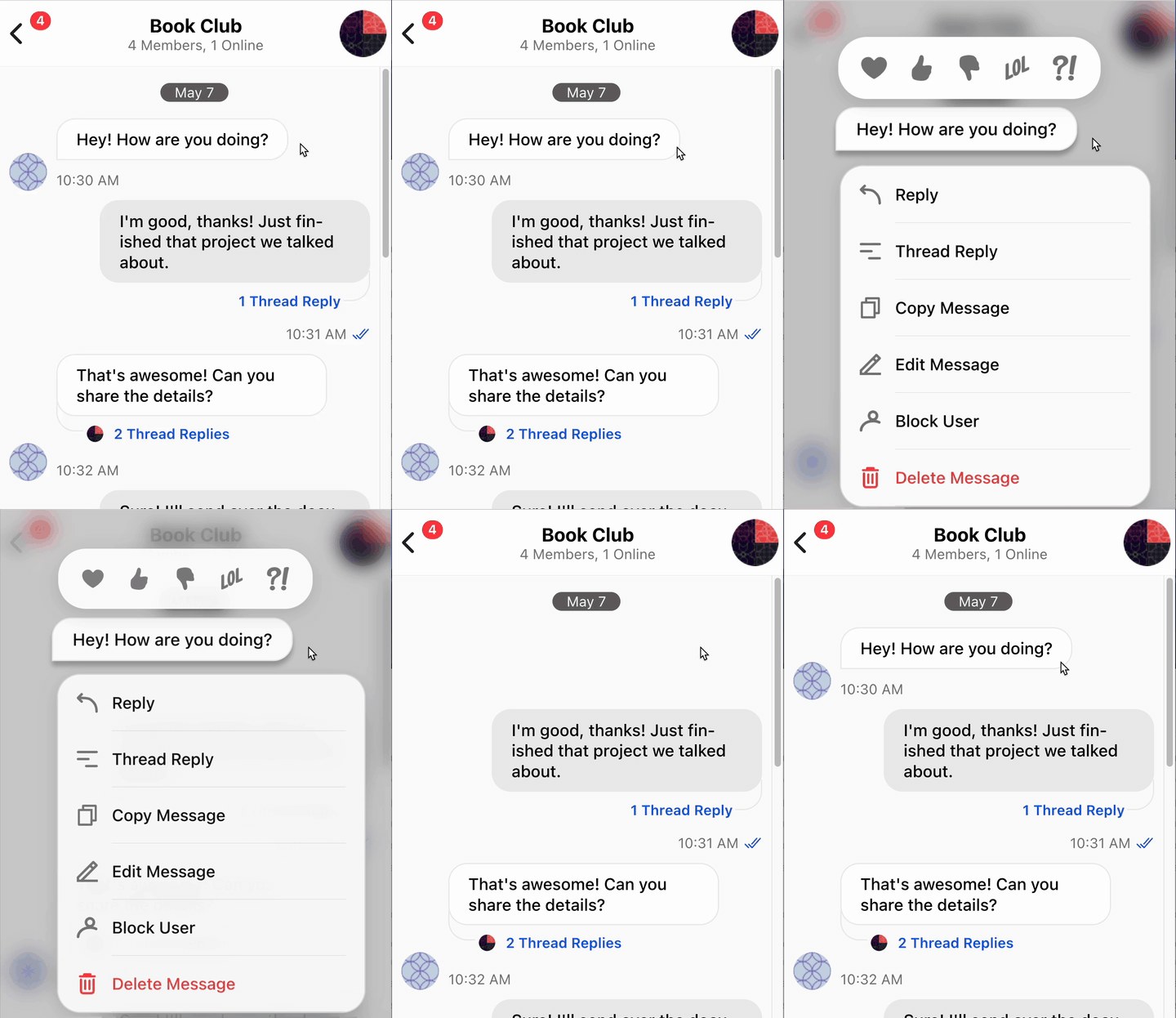 User taps backdrop while menu is still opening - animation smoothly reverses from current position.
Side-by-Side: Staggered Icons
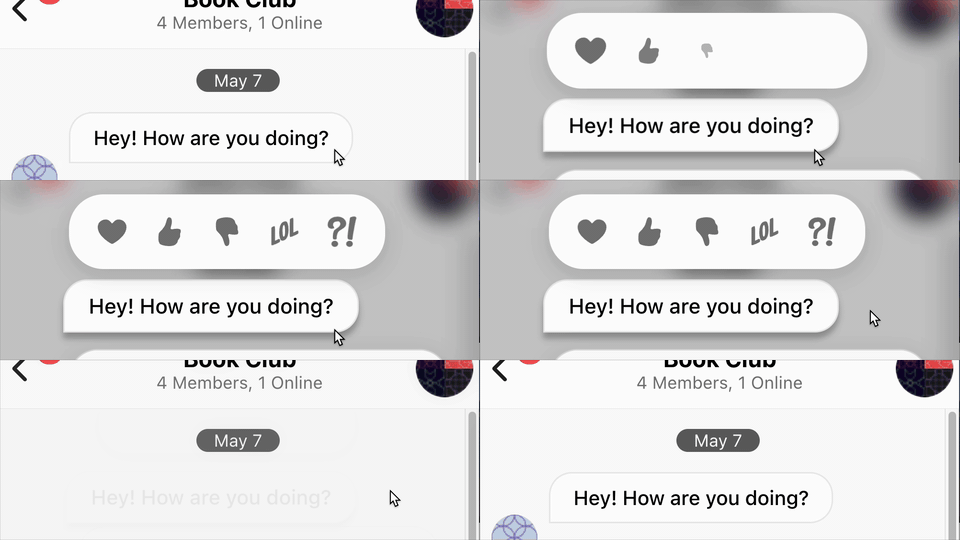 Each icon pops in 40ms after the previous one
Angular
trigger('staggerReactions', [
  transition(':enter', [
    query('@reactionIcon', [
      stagger('40ms', animateChild())
    ], { optional: true })
  ])
])

trigger('reactionIcon', [
  state('void', style({ opacity: 0, transform: 'scale(0)' })),
  state('*', style({ opacity: 1, transform: 'scale(1)' })),
  transition(':enter', animate('200ms cubic-bezier(0.34, 1.56, 0.64, 1)'))
])
Template requires nested triggers:
<div @staggerReactions>
  <button *ngFor="let r of reactions" @reactionIcon>
</div>
Ionic
const icons = elements.reactionIcons.map((icon, i) =>
  this.animationCtrl.create()
    .addElement(icon)
    .delay(i * 40)
    .fromTo('opacity', '0', '1')
    .fromTo('transform', 'scale(0)', 'scale(1)')
    .easing('cubic-bezier(0.34, 1.56, 0.64, 1)')
);
No special template structure needed.
Verdict: Ionic is more direct. “Element N starts at delay N*40ms” maps 1:1 to code.
Side-by-Side: Interruption Handling
Angular
// You need to track state manually
private animationState: 'idle' | 'opening' | 'open' | 'closing' = 'idle';

close() {
  if (this.animationState === 'opening') {
    // Cancel current? Wait for it? Start leave from current position?
    // Angular doesn't give you current animation progress easily
  }
  this.animationState = 'closing';
  this.isOpen = false;  // Triggers :leave
}
Ionic
close() {
  // Just reverse. Works whether opening, open, or already partially closing.
  this.animation.direction('reverse').play();
}
Verdict: Ionic. Not even close.
When Angular Animations Win
Angular animations aren’t bad. They’re great for:
- Route transitions -
@routeAnimationwith child routes - Simple toggles - Accordion, dropdown, modal show/hide
- List animations -
*ngForwith enter/leave per item - When you want zero JS - Animations defined in decorator, not runtime
Example where Angular shines:
trigger('slideIn', [
  transition(':enter', [
    style({ transform: 'translateX(-100%)' }),
    animate('300ms ease-out')
  ]),
  transition(':leave', [
    animate('300ms ease-in', style({ transform: 'translateX(-100%)' }))
  ])
])
Template:
<div *ngIf="showPanel" @slideIn class="side-panel">Clean, declarative, no JS needed. Perfect for this use case.
When Ionic AnimationController Wins
- Choreographed sequences - Multiple elements with coordinated timing
- Interruptible animations - User can cancel/reverse mid-animation
- Gesture-driven - Drag-to-dismiss, pull-to-refresh
- Dynamic parameters - Duration/easing based on runtime values
- Complex staggering - Different delays, easings per element
The Architecture That Makes It Work
Ionic’s imperative power is a double-edged sword. Without structure, your animation code becomes spaghetti. Here’s the pattern that works:
flowchart TB
    State["State Service
ContextMenuService"]
    Component["Component
Coordinator"]
    Factory["Animation Service
Factory"]

    State -->|"isOpen, position"| Component
    Component -->|"create animation"| Factory
    Factory -->|"Animation instance"| Component

    style State fill:#e1f5fe,stroke:#01579b
    style Component fill:#fff3e0,stroke:#e65100
    style Factory fill:#f3e5f5,stroke:#7b1fa2
The key insight: The animation service is a factory - it builds animations but doesn’t hold them. The component owns the animation instance and controls playback. This separation is what makes direction('reverse') work cleanly.
| Layer | Responsibility |
|---|---|
| State Service | Knows what is happening (isOpen, position) |
| Component | Coordinates state and animation lifecycle |
| Animation Service | Knows how to animate (factory pattern) |
Decision Flowchart
flowchart TD
    A["Is it enter/leave
triggered by *ngIf?"]
    A -->|Yes| B["Can user interrupt it?"]
    A -->|No| C["Is it multi-element
choreography?"]

    B -->|No| D["Angular animations"]
    B -->|Yes| E["Ionic AnimationController"]

    C -->|Yes| E
    C -->|No| F["Is it gesture-driven?"]

    F -->|Yes| E
    F -->|No| G["Either works
prefer Angular for simplicity"]

    style D fill:#c8e6c9,stroke:#2e7d32,color:#1b5e20
    style G fill:#c8e6c9,stroke:#2e7d32,color:#1b5e20
    style E fill:#bbdefb,stroke:#1565c0,color:#0d47a1
Conclusion
Both tools are good. The question is fit.
Angular animations = Declarative, state-based, great for simple transitions.
Ionic AnimationController = Imperative, flexible, great for complex choreography.
For my long-press context menu - with staggered elements, backdrop blur, and the need to interrupt mid-animation - Ionic AnimationController was the clear winner. But I’d still use Angular animations for a simple modal or tooltip.
Pick the tool that matches your use case, not the one that matches your ideology.